

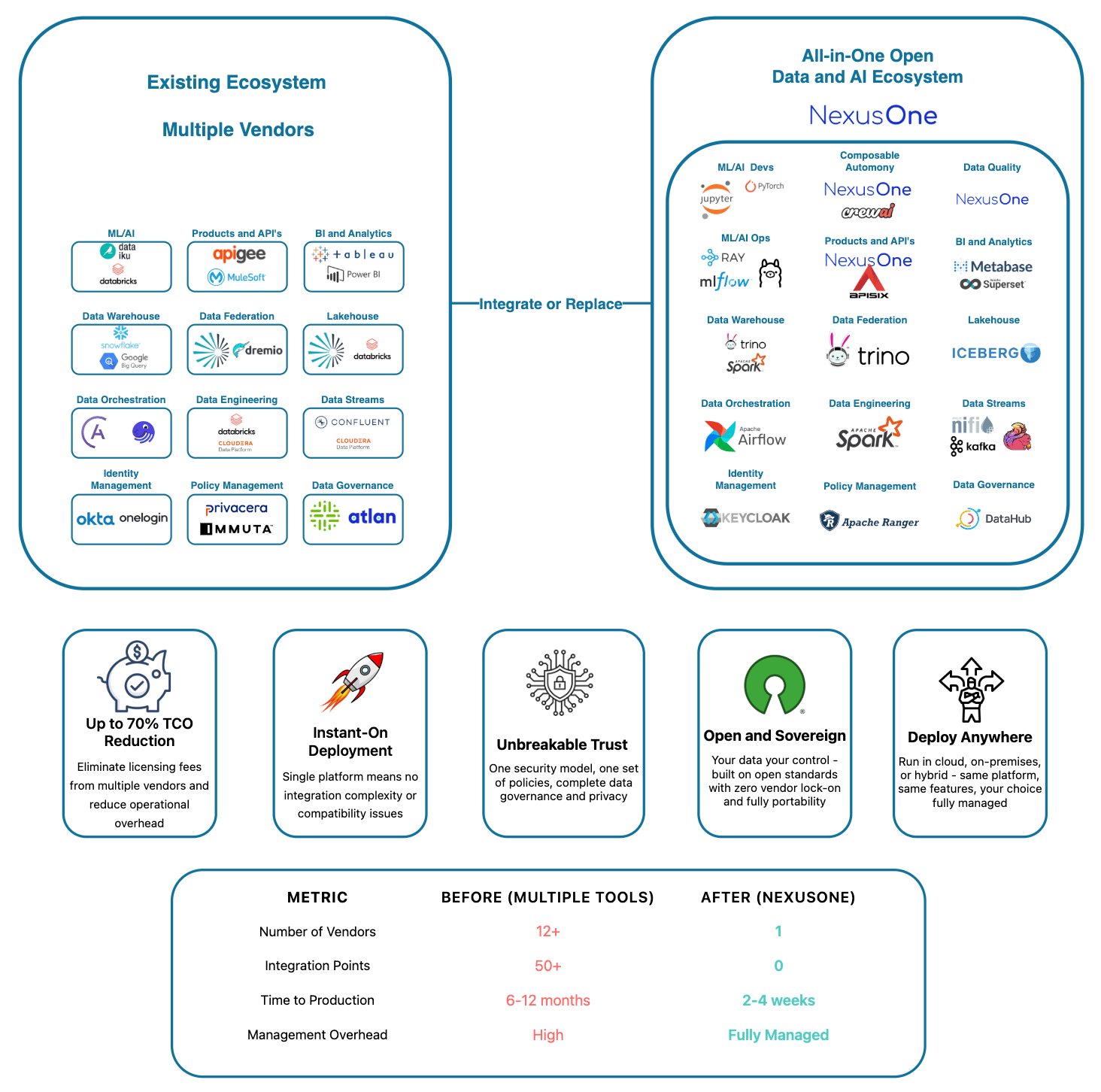
Product offering
Key features
NexusOne has two types of customers, those who use the features via the portal, and those who directly purchase and deploy the tools that power the portal. The NexusOne portal presents these underlying tools through the following branded feature names:- Ask: Helps you find insights from data using simple questions in natural language. You don’t need to write SQL queries, the system does that for you. A tool such as Ollama, a Large Language Model (LLM) manager, powers this feature.
- Build: Provides a data science environment for building ML models and advanced analytics. A tool such as JupyterHub powers this feature.
- Connect: Creates APIs and manages connections with other systems. A tool such as APISIX powers this feature.
- Crews: Creates smart workflows with AI agents. You configure individual agents with specific roles and goals, then assign them tasks to complete. Tools such as CrewsAI and PyTorch power this feature.
- Discover: Provides data visualization and business intelligence. Tools such as Superset and Trino power this feature.
- Engineer: Cleans and shapes data for analysis. You can also use AI suggestions or write your own transformation rules. It works with real-time and large-scale data. A tool such as Spark powers this feature.
- Govern: Lets admins manage who can access what. You can set roles, review permissions, and keep track of changes. Tools such as Keycloak and Ranger powers this feature.
- Ingest: Connects and loads data from different sources. You can set up data pipelines without needing technical skills. Tools such as DataHub, Debezium Server, or Spark, power this feature.
- Monitor: Shows you the status of all scheduled data jobs in real time. You can check progress, find errors, and see performance details. A tool such as Airflow powers this feature.
- Quality: Monitors your data for errors and ensures consistency. AI can also suggest rules and detect problems. Tools such as Spark power this feature.