

Key features
NexusOne AutoML training includes the following key features:- Automated train/eval split: NexusOne splits your data automatically so you never train and test on the same rows. If your data has a date column, then you can use a date boundary instead of a random split.
- Experiment tracking: NexusOne logs every training run automatically. Compare metrics across runs, inspect model artifacts, and register your best model for deployment, all from MLflow.
- Feature engineering hand-off: Launch a training job directly from a completed feature engineering job. The source table pre-fills automatically, keeping both steps linked for traceability.
- Model explainability: See exactly which columns matter most to your model’s predictions. For LightGBM supervised models, a Shapley Additive Explanations step runs alongside training and ranks each column by its impact.
- No-code pipeline generation: Train a model without writing pipeline code. Fill in your job configuration and NexusOne renders the Spark + MLflow DAG, uploads it to Airflow, and optionally triggers it immediately.
How it works
A training job takes your target table, fits a model against it, and logs the results to MLflow. The following sections explain each part of that process.What is a training job?
In NexusOne, a training job is the unit of work that produces a trained model from your target table. When you submit a training job, NexusOne does the following:- Renders an Airflow DAG definition based on the problem type, algorithm, and preset you selected.
- Uploads the DAG file to an object storage, and optionally triggers it immediately.
-
Airflow then does the following to execute the DAG:
- Reads your target table.
- Splits rows from your target table into training and evaluation data.
- Fits the ML model by running the selected algorithm against the training data. The algorithm adjusts its internal parameters until it learns patterns in your data. The result is a trained model.
- Logs the results to MLflow.
Supported problem types
When you create a training job, you must select a problem type that tells NexusOne what kind of prediction you want the model to make. The supported problem types include:- Anomaly detection: Flags records that look out of place compared to the rest of your data. No label column required.
- Binary classification: Predicts one of two outcomes, such as yes or no, or churn or retain. Requires a positive class value, which is the label value the model should treat as the positive outcome.
- Contextual bandit: Decides the best action to take given a situation, learning from the outcomes of past actions.
- Multiclass classification: Predicts one of three or more categories.
- Ranking: Orders items by relevance or preference, such as search results or product recommendations.
- Regression: Predicts a number, such as a price, a score, or a temperature.
Supported algorithms
The problem type you select determines which algorithms are available. The supported algorithms include:-
Classifiers: Use the following for binary or multiclass classification:
- LightGBM
- XGBoost
- Vowpal Wabbit
Vowpal Wabbit supports binary classification only. -
Rankers: Use the following for ranking:
- LightGBM
- XGBoost
-
Regressors: Use the following for regression:
- LightGBM
- Vowpal Wabbit
- XGBoost
LightGBM classifier and regressor support SHAP explainability. Other algorithms don’t. - Isolation forest: Use this for anomaly detection.
- Vowpal Wabbit contextual bandit: Use this for contextual bandit problems.
Supported presets
A preset is a predefined training configuration that trades off speed against accuracy. The available presets include:- Balanced: Balances training speed and model quality. This is the default.
- Best quality: Trains longer with more iterations for the highest accuracy. Best for production.
- Fast: Trains quickly with fewer iterations. Best for experimentation.
Why NexusOne splits a target table
Training a model on all your data and then testing it on the same data can give a false picture of accuracy. This is because your model has previously seen the answers. Splitting the target table reserves a portion of the data the model never trains on. When evaluation runs, the results reflect real-world performance. The split produces two types of data:- Training data: What your ML model learns from.
- Evaluation data: A portion of the split held back and used after training to measure how well the model performs on data it has never seen.
- 80% for training
- 20% for evaluation
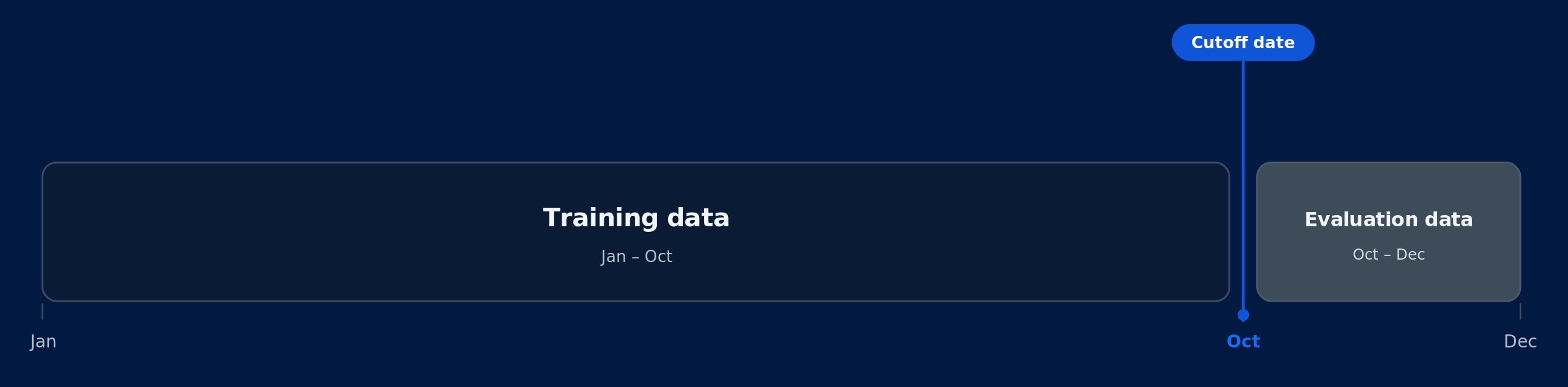
Time-based cutoff
Why NexusOne fits an ML model
Fitting is when NexusOne runs the training algorithm you configured against your training data. Without this step, the algorithm has no knowledge of your data and can’t make predictions. The algorithm adjusts its internal parameters until it learns patterns in your data. The result is a trained model.Why NexusOne logs training results to MLflow
MLflow is an open source platform for tracking machine learning experiments. An experiment is a label you assign to group related training jobs together. NexusOne logs each training job in MLflow so you have a record of the following:- Metrics: Numerical scores that measure model performance.
- Model artifacts: Trained model files produced by the job.
- Parameters: Configuration values you set for the training job, such as the algorithm, problem type, and feature count.
complete,
navigate to that experiment in MLflow to find the run.
Training job lifecycle
A training job moves through several statuses between submission and completion. Each status reflects where the job is in the training process, from DAG upload to a trained model or failure.Use cases
These examples show how different industries can use NexusOne’s training capabilities:- Retail: Train a model to predict how many units of a product you’ll sell in the future, using a target table prepared from sales history. Submit a training job, then review the model’s accuracy scores in MLflow before creating a deployment.
- Financial services: Train a fraud detection model on a target table built from transaction records. Submit a training job to classify transactions as fraudulent or legitimate. Review the model’s accuracy in MLflow before creating a deployment.