

- Inconsistency
- Errors
- Poor auditability
- Limited scalability
- HDFS
- Hive
- HBase
- Kafka
- Trino
- Spark
- Kyuubi
Key features
Ranger has the following key features:- Centralized security management: You have access to a central place when managing access across all services. Hence, you don’t need to configure security separately in each tool.
- Resource level permission: Controls access at the following levels:
- Database level
- Table level
- Column level
- File and folder level
- Kafka topic level
- Trino catalog/schema/table level
- Access control with Role-Based Access Control (RBAC): Enforces access through
roles and permissions. This includes:
- Access based on users and groups
- Administrative roles control who can manage Ranger
- Clean separation between data access and UI management permissions
- Access control with Attribute-Based Access Control (ABAC): Uses attributes to control
access dynamically. A resource attribute such as a tag, can have classifications such as:
- PII
- Financial
- Confidential
- Centralized auditing and monitoring: A single point to monitor and audit all data access.
This ensures the following:
- Ability to track all data access in one place
- Shows unusual activity, successful, and denied access attempts
- Used for compliance, security audits, and forensics
- Near real-time policy enforcement: Enforces policies instantly without downtime.
This ensures the following:
- Dynamically pushed policies
- No service restarts required
- Changes take effect immediately
- Integration with external authentication systems: Integrates with the following
authentication systems to enforce authorization:
- Keycloak
- Lightweight Directory Access Protocol (LDAP)
- Active Directory
- Kerberos
- Policy versioning and history: Maintains a complete history of policy changes for
accountability, rollbacks, and compliance. This allows it record the following:
- Who modified what
- When did the modification happen
Ranger components
Ranger follows a distributed architecture with the following key components working together:-
Ranger Admin server: This is the central management service of Ranger that allows
administrators create and manage security rules.
Some of the key responsibilities it performs include:
- Hosting the Ranger UI
- Storing all security policies
- Managing the following
- Users
- Groups
- Roles
- Permissions
- Distributing policies to service plugins
- Maintaining the policy database
-
Ranger plugins: These act as the security guards inside a data service. These plugins intercept access requests before they reach the data service. During interception, it does the following:
- Evaluates the request against policies downloaded from a Ranger Admin server
- Make authorization decisions
- Log audit events
-
Ranger policy database: This is the backend database used to store the following:
- Policies
- Users
- Groups
- Roles
- Service definitions
- MySQL
- PostgreSQL
- Oracle
-
Ranger audit store: The audit store is a centralized repository that records all the data access activity
enforced by Ranger. The audit store captures the following:
- Who accessed what
- From which service
- Action performed, such as a read, write, or query
- Timestamp
- Allowed or denied access
- Solr
- Elasticsearch
- HDFS
- Ranger usersync: This periodically syncs users and groups from Keycloak into Ranger’s database. This sync ensures that organizational changes reflect in the authorization system without manual intervention.
Core administrator concepts
This section explains the key concepts administrators need to understand to define and manage policies in Ranger.- Services: These are external system that Ranger secures. This external system might be Spark or Trino. Each service has its own set of policies and a Ranger plugin deployed within. Administrators must first define a service before creating policies for it.
- Resources: The objects Ranger protects. These objects might be databases, tables, columns, files, or topics. Ranger uses hierarchical resource structures that vary by service type. For example, Ranger organizes Trino resources as database > table > column, while HDFS resources are file paths.
- Users and groups: Ranger synchronizes users and groups from LDAP or Active Directory. Policies can target individual users or entire groups. Group-based policies are strongly preferred for maintainability.
- Roles: Ranger roles are collections of users and groups that simplify policy management. Instead of adding multiple groups to a policy, create a role containing those groups and grant permissions to the role.
- Policy: A policy is a rule that administrators create to define who can perform which
actions on specific resources. Ranger supports the following policy types:
- Access policies: The most common policy type. It defines who can perform which operations on specific resources. It does this by specifying allow or deny rules, with deny rules taking precedence.
- Masking policies: These policies transform data before returning it to you.
Masking functions include:
- Redact: Replace entire value with “X” characters
- Partial mask: Show only the last 4 characters
- Hash: Replace with
SHA-256hash - Nullify: Return
NULLvalue - Custom: Apply custom user-defined functions for transformation
- Row filter policies: These policies add
WHEREclause conditions to queries, so it can restrict which rows you can see. For example, a sales representative might only see rows where the region matches their assigned region.
- Policy condition: These are additional rules that further refine when or how a policy
applies to a user or group. Examples include:
- IP address ranges: Allows access only from corporate networks
- Time ranges: Allows access only during business hours
- Custom attributes: Enforces access based on resource or user-specific metadata
Exploring the Ranger UI
The Ranger UI provides a web-based interface to manage policies. It shows the integrated apps, their reports, and more. You can launch Ranger using the following designated URL:When you purchase NexusOne, you receive a client name.
Replace
client with your assigned client name.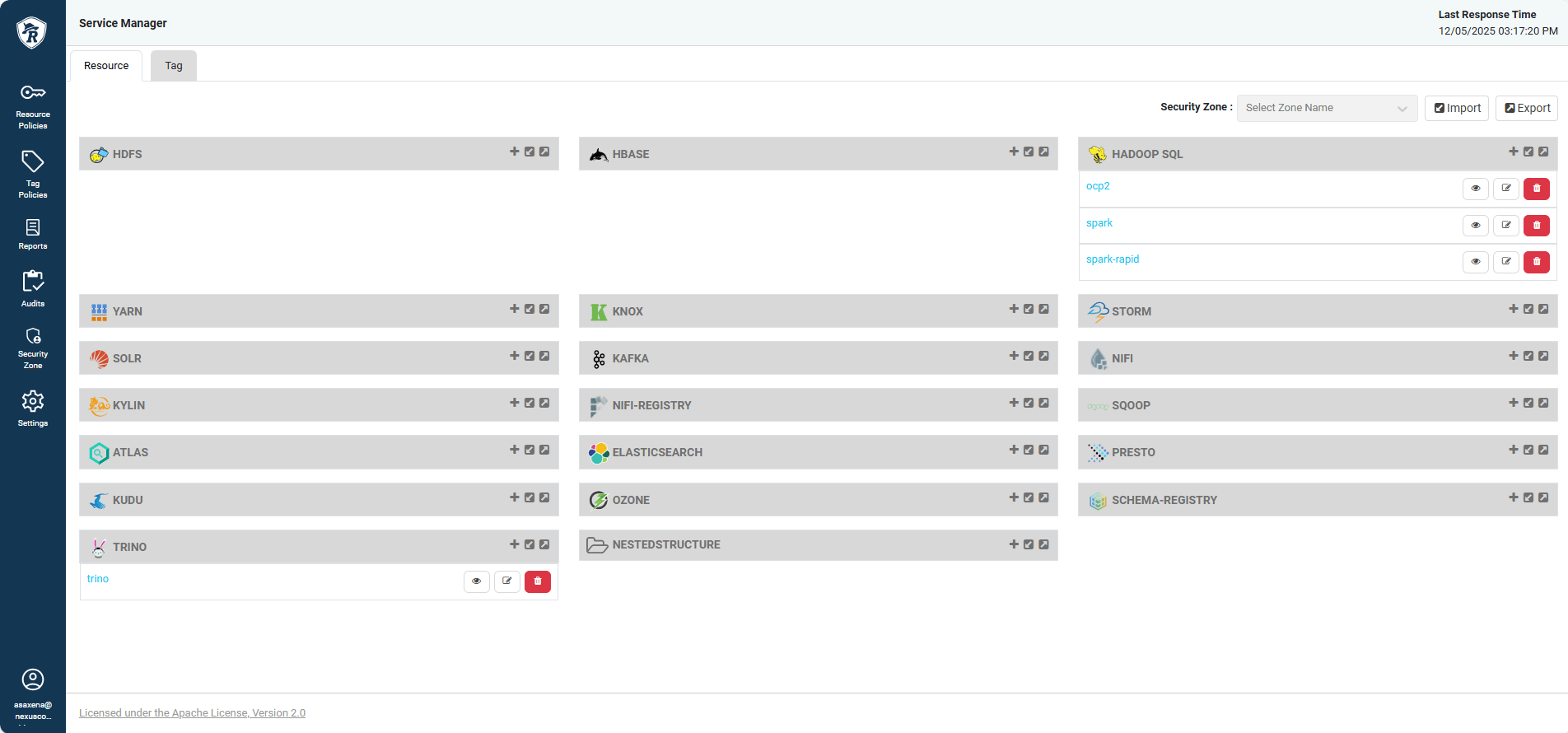
Ranger homepage layout
Access requirements
To manage policies in the Ranger UI, you must have the following roles:ranger_admin- Any other role mapped to the
ranger_adminrole
Integration with other NexusOne apps
This section explores deeper into how Ranger integrates with Trino and Spark within the NexusOne platform.Trino
Ranger is Trino’s security system, which ensures that only authorized people can query specific data. The architecture comprises the following main components:- Trino cluster:
- Has one coordinator and multiple “worker” servers
- Handles user requests and queries using the coordinator
- Workers do the actual data processing
- Ranger Admin: Web-based control panel where administrators set up security rules. A security rule can specify that the marketing team can only see customer names, while the finance team can see full customer records, including payment information.
- Ranger plugin:
- Installed on Trino’s coordinator
- Acts as a bridge between Trino and Ranger Admin
- Constantly checks with Ranger Admin: “Is this user allowed to run this query?”
- Other supporting components:
- Postgres database: Stores all security policies and user information
- Opensearch audit storage: Keeps logs of who accessed what data and when
- You send a query to Trino
- The Trino coordinator receives the query and asks the Ranger plugin, “Is this user allowed to do this?”
- The Ranger plugin checks its policies from the Ranger Admin component and asks
the following questions:
- Does this user have permission to see the ‘orders’ table?
- Can they see all columns or only specific ones?
- One of the following outcomes occurs:
- Allowed: Trino runs the query and returns results
- Denied: User gets an “Access Denied” message
- Ranger records the access attempt in the audit log for compliance and security monitoring
Spark
Ranger is Spark’s security system, which ensures that only authorized people can perform compute operations on specific data. By default, Spark doesn’t provide enterprise-grade authorization at the database, table, column, or row level. So, Ranger fills this gap by acting as Spark’s external authorization engine. The architecture comprises the following main components:- Ranger Admin server: A central control plane where all Spark authorization rules
live. It’s used for the following:
- Creating policies
- Managing roles
- Auditing access
- Ranger Spark plugin:
- Installed inside the Spark environment
- Runs on the Spark SQL engine
- Responsible for the following:
- Intercepting every SQL query
- Sending access requests to Ranger Admin
- Enforcing allow or deny decisions in real time
- Policy storage:
- A PostgreSQL database for storing policies
- Plugin pulls these policies using REST APIs and caches them locally
- User and group sync:
- Ensures policies apply to correct identities
- User authentication uses Keycloak
- Ranger sync service pulls the following:
- Users
- Groups
- Roles
- Audit store:
- Stores logs of all Spark access attempts in one of the following:
- Opensearch
- Object storage
- Its use include:
- Security monitoring
- Compliance audits
- Stores logs of all Spark access attempts in one of the following:
- You log into NexusOne via Keycloak, and a verification of your identity and group membership occurs.
- If the verification is successful, it results to the issuance of a valid access token.
- You submit a Spark SQL query through Spark, a notebook, or a batch job.
- The Ranger Spark plugin intercepts the query and extracts the username, database, table, column, and query type.
- The plugin sends an authorization request to Ranger Admin with the user, resource, and action details.
- Ranger evaluates the user, group, deny rules, row filters, and data masking policies.
- If Ranger returns an
ALLOWa query executes, if it’s aDENY, the query fails with an authorization error. - The audit store records the complete access attempt, such as the user, resource, timestamp, IP, and query type.
What Ranger controls
Ranger enforces permissions on data and resources to determine who can access them. Some of these data and resources it controls include:- Table, view, and column-level permissions: Controls who can access specific databases, tables, views, and columns.
- Row-level filtering: Restricts which rows you can see based on conditions. For example, you only see your own department’s data.
- Data masking: Automatically masks or redacts sensitive column values based on user roles. For example, show only the last 4 digits of a credit card.
- URI/storage-level permissions: Controls access to underlying storage locations to prevent the bypassing of table security, which then leads to direct access to data files.
How Ranger secures NexusOne
The following capabilities show how Ranger secures the NexusOne platform:- Centralized security control: Rather than managing security separately in Trino, Spark, Ranger provides a single pane of glass for defining and enforcing policies.
- Multi-Layer protection: Ranger enforces security at the following multiple levels
simultaneously:
- Service access, which describes who can use Trino
- Database or schema access, which describes databases that are visible
- Table access, which describes queryable tables
- Column access, which describes the returned columns
- Row access, which describes the returned rows
- Dynamic flexibility: As NexusOne evolves with new projects, data sources, and users, Ranger adapts without requiring app changes. This ensures that new policies take effect within seconds, and the granting and revoking of access is instant.
- Compliance and auditability: There are logs of every access attempt across NexusOne. This
creates a complete audit trail for compliance reporting and security analysis. By querying Ranger’s
audit repository, administrators can answer the following questions:
- Who accessed this sensitive table?
- When did user X last access financial data?
- Are there any unauthorized access attempts?
- User experience: While providing strong security, Ranger remains transparent to end users. Data analysts, data scientists, and apps interact with Trino and Spark normally. You see only the data you’re authorized to access, and sensitive values are also automatically masked. This means you don’t need to understand or work around complex security mechanisms.
- Operational efficiency: For NexusOne administrators, Ranger reduces operational burden through group-based policies, tag-based automation, and centralized management. Security teams can now spend less time on access management and more time on strategic security improvements.
Additional resources
- To learn about best practices when using Ranger, refer to the Ranger best practices page.
- To learn practical ways to use Ranger in the NexusOne environment, refer to the Ranger hands-on examples page.
- For more details about Ranger, refer to the Ranger official documentation.
- For more details about Spark in NexusOne, refer to Spark in NexusOne page.
- For more details about Trino in NexusOne, refer to Trino in NexusOne page.