

Benefits of using NiFi
Organizations use NiFi because it provides the following:- Ease of use: Visually built data flows without the need to write custom code
- Broad connectivity: Supports hundreds of processors that interact with files, databases, APIs, cloud services, and messaging systems
- Flow management and governance: Includes back-pressure control, prioritization, data lineage, and detailed monitoring
- Scalability: Designed to run on a single node or as a distributed cluster
- Flexibility: Handles real-time streaming, batch processing, and everything in between
Typical use cases
NiFi is commonly used to solve a wide range of data integration and movement challenges, such as:- Centralized data ingestion: Collects data from sources such as APIs, filesystems, IoT devices, cloud storage, messaging systems, and enterprise apps.
- Distributed data routing: Routes data to different destinations based on content, schema, or attributes that enable conditional workflows.
- In-transit data transformation: Applies lightweight transformations such as format conversion, enrichment, filtering, attribute updates, and JSON/XML manipulation as data flows.
- Streaming and event data processing: Publishes and subscribes to Kafka, Message Queuing Telemetry Transport (MQTT), Advanced Message Queuing Protocol (AMQP), and other messaging platforms to support real-time or near-real-time pipelines.
- Batch to stream bridging: Integrates scheduled data ingestion jobs with continuous data streams for hybrid workflows.
- System-to-system coordination: Acts as a bridge between different apps, storage systems, operational services, or analytic platforms.
Key concepts
Apache NiFi introduces several key concepts that form the foundation of how data moves through a flow. Understanding these concepts helps you design, manage, and troubleshoot data pipelines effectively.FlowFile
A FlowFile is the basic unit of data in NiFi. It consists of two parts:- Content: The actual data, such as a JSON, CSV, or binary file.
- Attributes: Key-value metadata associated with the content. It’s used to make routing and transformation decisions.
Processor
A processor is a building block that performs specific operations on data, such as:- Reading from a source
- Transforming content
- Routing data
- Writing to a destination
- Communicating with external systems
Connection
A connection links processors together and acts as a queue for FlowFiles. Connections enable:- Buffering when downstream components slow down
- Back-pressure handling
- Prioritization and load distribution
Process group
A process group is a container for organizing processors and sub-flows that helps you do the following:- Modularize complex flows
- Reuse components
- Improve readability and maintainability
Controller service
A controller service provides shared, reusable configurations used by multiple processors. Typical examples include:- Database connection pools
- SSL/TLS context configurations
- Record readers and writers
- Schema registries
Provenance
Data provenance provides full traceability of how data flows through a system. NiFi automatically tracks the following:- Where a FlowFile originated
- What transformations occurred
- Route of the FlowFile
- Time and destination of the FlowFile
Exploring the NiFi UI
Apache NiFi provides a web-based user interface for designing and managing dataflows. Accessing NiFi typically involves connecting to an instance running locally, on-premises, or in a cloud environment. NiFi is available at the following designated URL:When you purchase NexusOne, you receive a client name. Replace client with your
assigned client name. The following sections describe several sidebars on the Kyuubi UI.
Authentication
While NiFi supports multiple authentication mechanisms, NexusOne’s NiFi integration uses OpenID Connect (OIDC) for all user authentication. This means you must log in through the configured OIDC provider before accessing the NiFi UI.User interface overview
When you log into NiFi, you should see the NiFi homepage. This is the primary workspace for building and managing flows. The interface includes the following core options:- Component toolbar: Options for adding components, starting/stopping flows, and accessing configuration views
- Component: A palette describing a component
- Operator palette: Manages permissions, process groups, and more
- Global menu: Provides access to system diagnostics, controller services, templates, and provenance
- Status bar: Visual signals that show running components, errors, warnings, or back-pressure conditions
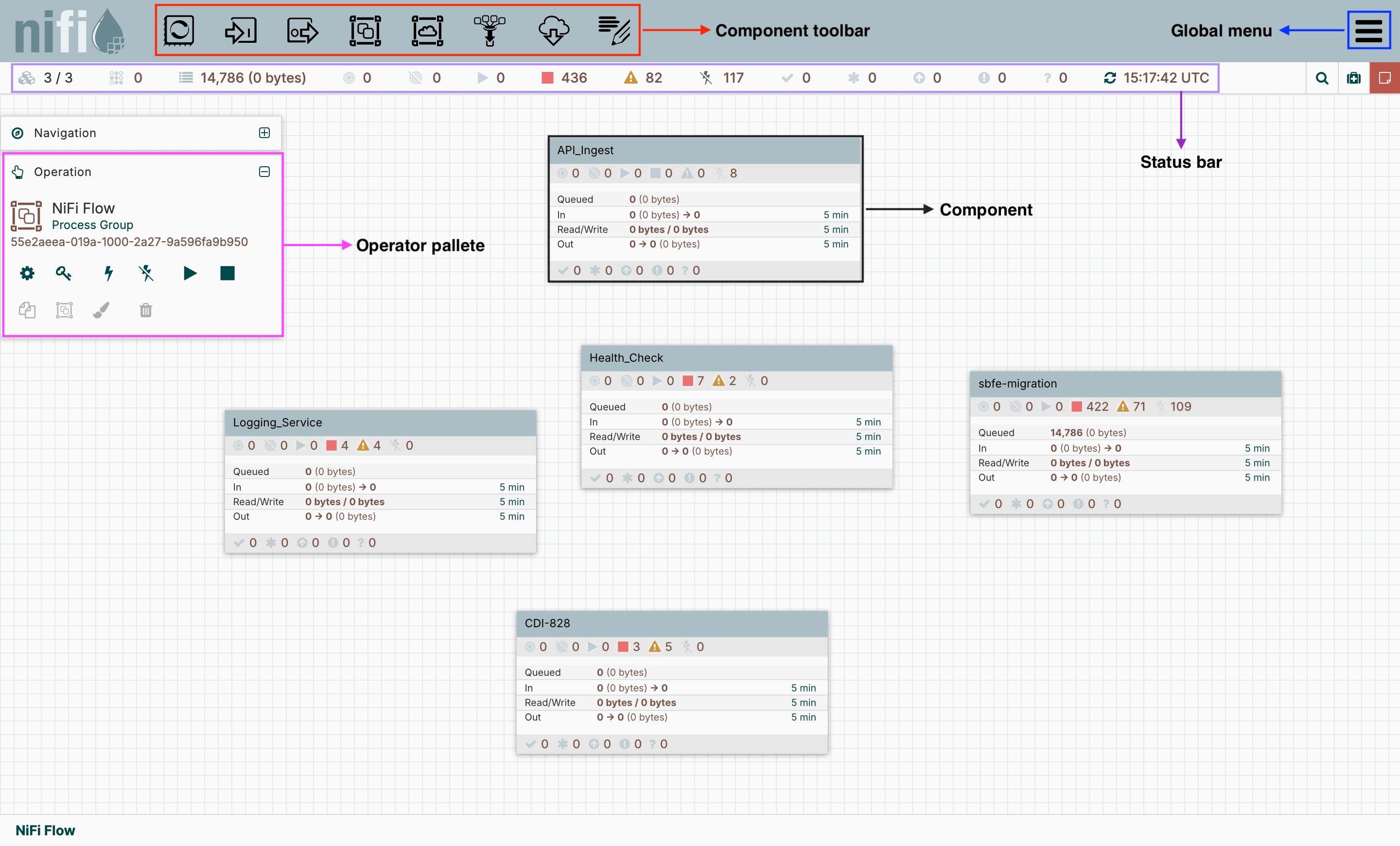
Apache NiFi homepage layout
Additional resources
- To learn practical ways to use NiFi in the NexusOne environment, refer to the NiFi hands-on examples page.
- To learn about best practices when using NiFi, refer to the NiFi best practices page.
- For more details about NiFi, refer to the NiFi official documentation.