

Uses cases
Metabase is an effective solution for a wide range of analytical needs in both technical and non-technical teams. It excels in scenarios such as:- Empowering business users who need to ask questions and explore data without writing SQL
- Providing quick, ad-hoc insights, such as checking recent signups, sales trends, or operational metrics
- Creating lightweight dashboards that support interactive filtering, drill-downs, and simple visual exploration
- Operating within secure enterprise environments, where features like Security Assertion Markup Language (SAML), Single Sign-On (SSO), JSON Web Token (JWT) authentication, HTTPS ingress, and embedded analytics are crucial
Metabase and Trino
Trino is a distributed SQL query engine that lets Metabase query multiple data sources such as databases or Iceberg tables, through a single connection.Automatic configuration
Within NexusOne, the Trino connection is already preconfigured in Metabase. That means the host, port, catalog, or credentials are available before the app starts. With all these already configured, you can start exploring data immediately.How Metabase periodically updates its content from Trino
Some queries might be expensive, so Metabase takes extra measures to sync with Trino-connected catalogs. This reduces load on Trino and improves Metabase’s responsiveness. These measures include:- Metadata refresh: Metabase updates its internal metadata cache so it knows about the latest table and column definitions of the Trino-connected data sources.
- Field value cache: Metabase stores the distinct values of a field that appear in dropdown filters to speed up the UI.
- Hourly metadata sync
- Daily field value cache refresh
Exploring the Metabase UI
The Metabase homepage is your starting point for navigating data, creating content, and reopening recent work. This section explores the Metabase UI and how to navigate it. Before exploring these, you can launch Metabase using the following designated URL:When you purchase NexusOne, you receive a client name.
Replace
client with your assigned client name.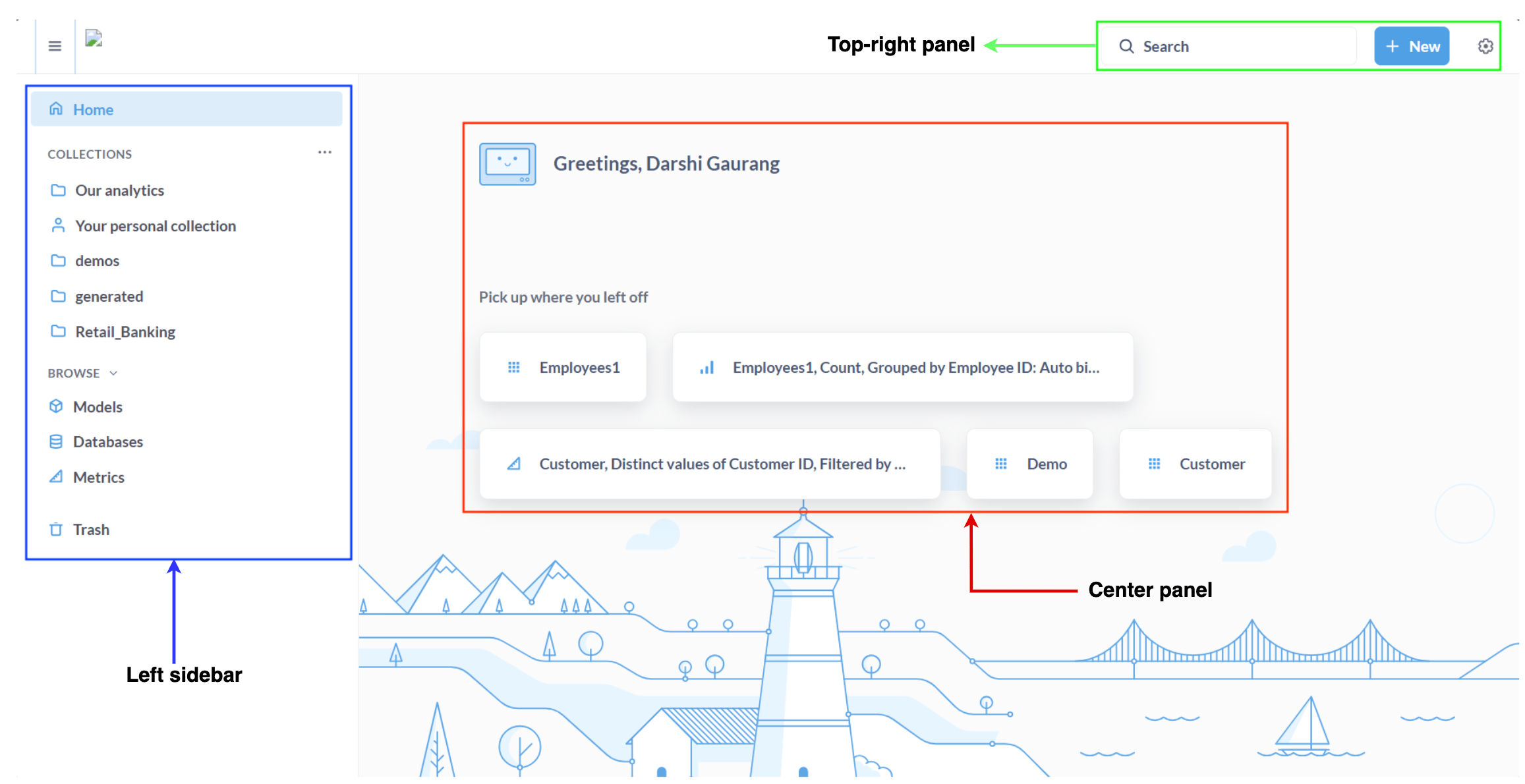
Metabase homepage
Left sidebar
As seen in the previous image, the left sidebar provides quick access to core areas of Metabase. It organizes your workflow so you can move between dashboards, databases, and other resources efficiently. It comprises the following:Home: Returns to the main screenCollections: Folders containing dashboards, questions, and modelsBrowse:Models: Contains reusable virtual tablesDatabases: Browse connected databases and tablesMetrics: Centrally defined business metrics
Trash: Recover deleted items
Center panel
As seen in the previous image, the center panel displays the following:- A greeting message
- The
Pick up where you left offsection lists your most recent questions, tables, or dashboards so you can quickly continue working.
Top-right panel
As seen in the previous image, the top-right panel displays the following:Search: Find questions, dashboards, tables, or collections.New: When you click New, it displays the following options in the dropdown:Question: Create a new query using the visual builder or custom expressions.SQL Query: Write a custom SQL statement to build a question or model.Dashboard: Combine multiple questions into one interactive view.Collection: Create a folder to organize dashboards, questions, and models.Model: Build a reusable, cleaned-up virtual table for analysis.Metric: Define a standardized business metric for consistent reporting.
Metabase query methods
In Metabase, you can use either the query builder or SQL editor to query data through Trino. This depends on your user role and expertise.GUI query builder
The query builder is a visual interface that allows non-technical users to create questions and dashboards without writing SQL. It supports the following features:- Click-based filters: Refine data directly in your questions or dashboard widgets.
- Aggregations and summaries: Summarize and aggregate your data, such as sums, averages, or counts.
- Grouping and breakdowns: Group data by categories to better understand trends.
- Easy visualization selection: Choose the best way to visualize your data using graphs or bar charts.
- Data exploration without writing SQL: Create both questions and widgets, then add them to dashboards for easy exploration.
SQL editor
For data analysts, engineers, and power users working with complex datasets or performing advanced analytics, the SQL editor exposes the full capabilities of Trino. Through this interface, you can do the following:- Write raw SQL queries
- Use parameters inside SQL statements
- Save reusable queries or native questions
- Join across datasets and catalogs
Additional resources
- To learn about best practices when using Metabase, refer to the Metabase best practices page.
- To learn practical ways to use Metabase in the NexusOne environment, refer to the Metabase hands-on examples page.
- For more details about Metabase, refer to the Metabase official documentation.
- If you are using the NexusOne portal to visualize your dataset, refer to the Discover page.