

Environments and runtime specifications
This section describes the NexusOne environments you can deploy Debezium server instances, and the runtime specifications of the Debezium server, such as the software versions, supported connectors, and default configurations.Deployment context
Within NexusOne, you can deploy Debezium server instances in the following environments:- The NexusOne portal: When using the Ingest feature within the portal, it includes a data mirroring sub-feature for capturing streams of database changes. This sub-feature deploys a Debezium server when it’s used.
- Public cloud or on-premises: When you purchase NexusOne to deploy into your public cloud or on-premises, it comes pre-packaged with a Debezium server.
Current version information
- Debezium server:
3.1.1 - Debezium Iceberg Extension:
0.9.0 - Apache Iceberg:
1.8.1
Default configurations
By default, within NexusOne, the Debezium server writes CDC events to an Iceberg-compliant lakehouse composed of a Hive metastore and S3-compatible object storage. This configuration provides the following:- ACID transaction guarantees through the Iceberg table format
- Schema evolution support for handling source schema changes
- Time travel capabilities for historical data access
- Automatic metadata management via Hive metastore
- Scalable storage on S3-compatible infrastructure
Platform-managed default settings
NexusOne manages the following default configurations for the Debezium Server and Iceberg sink:- Snapshot mode:
initialTheinitialmode performs a full table snapshot followed by streaming changes - Batch processing: Optimized batch sizes for lakehouse ingestion
- Connection pooling: Pre-configured for typical workloads
- Error handling: Automatic retry mechanisms with exponential backoff
Supported source connectors
NexusOne’s Debezium server deployment supports the following database connectors:- PostgreSQL: Captures row-level changes using logical replication
- SQL Server: Streams changes via SQL Server CDC or Change Tracking
- MySQL: Monitors binary logs for data modification events
- Oracle: Tracks changes through LogMiner or Oracle GoldenGate
INSERT, UPDATE, and DELETE
operations with before or after state capture, where applicable.
Source database configuration
Debezium server relies on a source database to produce change events in a format it can consume. Proper configuration of each database ensures that each insert, update, and delete is actually captured reliably and delivered to the lakehouse. Prerequisites and setup procedures vary by database vendor, and they include enabling CDC features, configuring replication slots, and setting appropriate permissions. To ensure that Debezium server can capture changes reliably, each database vendor requires specific configuration and user permissions. The following outlines the required settings for both aspects.- Database configuration: Enable CDC mechanisms specific to your database platform.
Use any of the following:
- PostgreSQL: Requires logical replication configuration
- SQL Server: Needs CDC or Change Tracking enabled
- MySQL: Requires binary logging with
ROWformat - Oracle: Requires supplemental logging configuration
- User permissions: Grant appropriate privileges for CDC operations.
Use the following:
- Replication permissions for reading change streams
- Metadata access for schema discovery
- Connection privileges for establishing monitoring sessions
PostgreSQL configuration
PostgreSQL uses logical replication to expose change events.-
Set
wal_leveltologicalin thepostgresql.conffile. - Create a replication slot for Debezium to consume changes.
-
Install the
pgoutputlogical decoding plugin. The plugin is available by default in PostgreSQL 10+. -
Grant the following replication permissions to the Debezium user:
SQL server configuration
SQL Server requires that you enable CDC at both the database and table levels.-
Enable CDC at the database level:
-
Enable CDC for specific tables:
-
Grant appropriate permissions to the Debezium user:
MySQL configuration
MySQL uses binary logging to track changes.-
Enable binary logging in
my.cnf: -
Grant replication permissions:
Oracle configuration
Oracle requires supplemental logging and appropriate permissions.-
Enable database-level supplemental logging:
-
Enable table-level supplemental logging for specific tables:
-
Grant required permissions:
Deployment in the NexusOne portal
As previously described, you can deploy and configure Debezium Server instances by using the NexusOne Ingest feature within the portal, which includes a data mirroring sub-feature with customizable connector settings, transformation rules, and sink destinations. The following image shows the user interface of the data mirroring sub-feature in the NexusOne portal.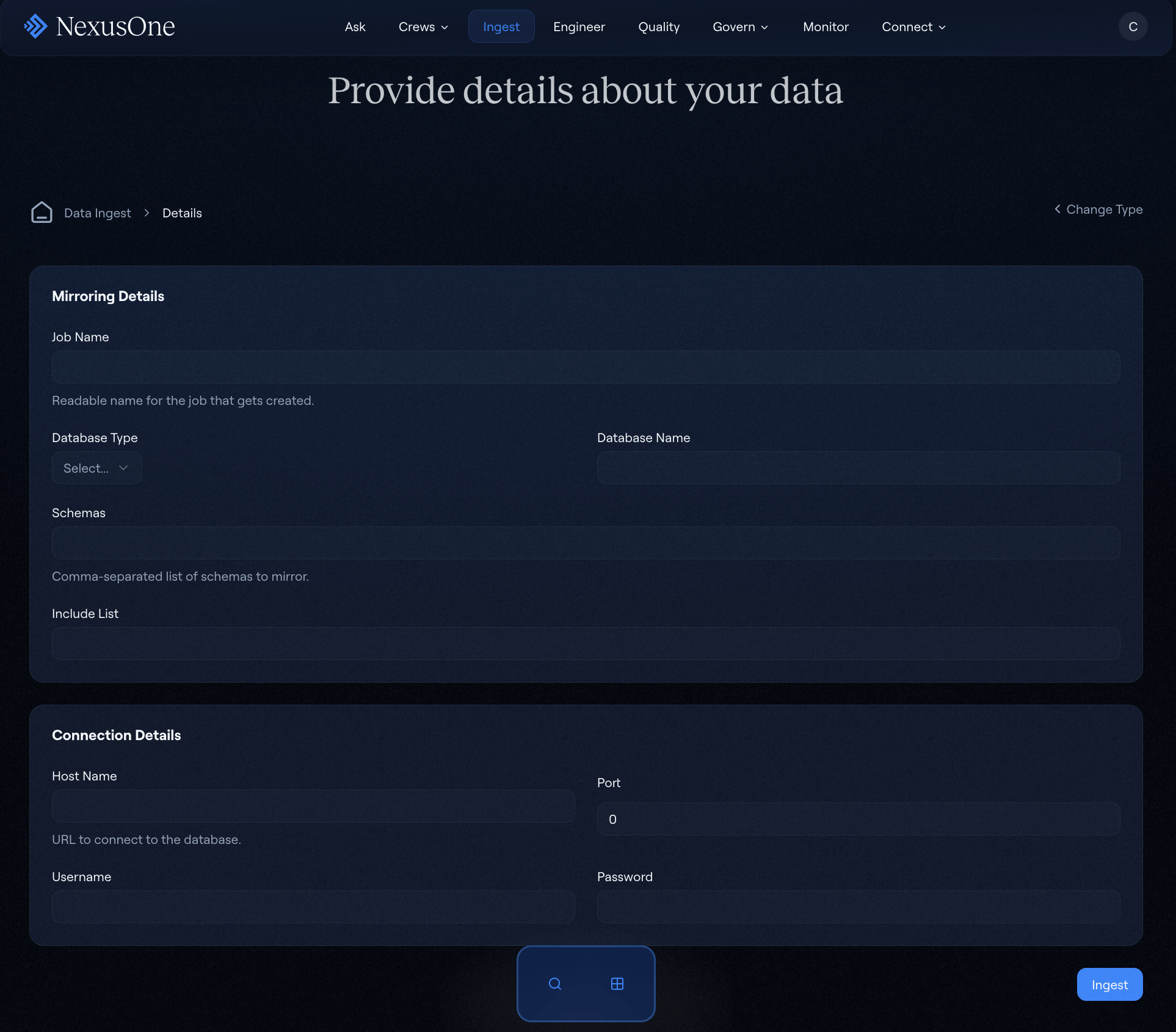
Data mirroring in the NexusOne portal
- Configure source connector settings:
- Select a database type such as PostgreSQL, SQL Server, MySQL, or Oracle.
- Provide connection details such as the hostname, port, or database name.
- Configure authentication credentials.
- Specify schema and table filters.
- Configure sink destination:
- Use the default pre-populated Iceberg lakehouse configuration.
- Customize target schema and table names.
- Set up a partition strategy for large tables.
- Configure optional settings:
- Select a snapshot mode for initial data load.
- Set a heartbeat interval for connection monitoring.
- Set a schema evolution handling.
- Set an error handling and retry policy.
- Review the configuration summary and deploy.
- Monitor deployment status and verify a successful connection.
Understanding the CDC event structure
The Debezium server produces structured change events that contain the before and after states of data, along with metadata about change operations.Event structure components
Each Debezium CDC event contains components that describe the change and provide context for downstream consumers. The following components include:- Envelope: Wraps the CDC event in a standard structure. The structure
comprises the following:
before: Row state before the change, forINSERToperations, this field isnullafter: Row state after the change, forDELETEoperations, this field isnullop: Operation type:cindicates create,uindicates update,dindicates delete, andrindicates a read operation for snapshot events.ts_ms: Timestamp of the change in millisecondssource: Metadata about the source system and position
- Source metadata: Provides traceability for each event. It includes the following:
- Database name and schema
- Table name
- Transaction ID or Log Sequence Number (LSN)
- Timestamp from source system
- Connector name and version
- Schema information: Describes the structure of the before or after values.
It includes the following:
- Field names and data types
- Optional/required indicators
- Default values were applicable
Iceberg sink transformation
When streaming events into Iceberg tables in a lakehouse, the event undergoes a transformation that converts raw events into a structured table format by:- Using the
opfield to determine the type of operation, such as anINSERT,UPDATE, orDELETE - Flattening the
beforeandaftervalues into columns - Optionally including metadata columns for audit and lineage tracking
- Storing Debezium coordinates for idempotency
- Extracting partition keys for efficient query performance
Additional resources
- To learn about best practices when using Debezium, refer to the Debezium best practices page.
- To learn how to troubleshoot common Debezium server issues in the NexusOne environment, refer to the Troubleshoot common Debezium server issues page.
- For more details, refer to the official Debezium documentation and Apache Iceberg documentation. The Debezium community also provides an extensive guide on source connector configurations.
- If you are using the NexusOne portal and want to learn how to use the Debezium server, refer to the Ingest page.