> ## Documentation Index
> Fetch the complete documentation index at: https://docs.nx1cloud.com/llms.txt
> Use this file to discover all available pages before exploring further.
# Kyuubi in NexusOne
> Overview of Apache Kyuubi, a SQL gateway enabling multi-tenant access to compute engines in NexusOne.
Apache Kyuubi is a distributed and multi-tenant SQL gateway that brokers connections between
Java Database Connectivity (JDBC) or Open Database Connectivity (ODBC) clients, such as BI
tools or Jupyter Notebooks, and compute engines such as Spark, Flink, or Trino.
## Core capabilities
Kyuubi supports several core capabilities, which include:
* **JDBC/ODBC access**: By supporting the JDBC/ODBC universal database connectivity
standards, Kyuubi allows a wide range of clients, such as Tableau, Power BI, DBeaver,
and custom apps, to connect.
* **Multi-tenancy**: Kyuubi serves multiple tenants, which are logical groups of users within
a Kyuubi instance. It also isolates sessions, resources, configurations, and data access
by preventing one tenant's workload from impacting another's.
* **Spark engines**: Kyuubi is deeply integrated with Apache Spark. It can dynamically
launch and manage Spark SQL engine instances on demand, for example, in YARN or Kubernetes,
for each user or session, providing the full power of distributed Spark processing through
simple SQL calls.
* **SQL gateway**: Kyuubi extends the
[Apache Spark Thrift JDBC/ODBC Server](https://spark.apache.org/docs/latest/sql-distributed-sql-engine.html),
which exposes a JDBC/ODBC interface over the Thrift protocol. This allows multiple
clients to connect and run SQL queries without needing to know the details of the
backend execution engine.
## Supported SQL engines
Kyuubi supports two types of SQL engines, which include:
* **Spark SQL**: This is the primary and most feature-complete engine supported by
Kyuubi. It leverages Spark's distributed computing power for complex ETL, batch
processing, and SQL analytics.
* **Optional engines such as Trino or Flink**: Kyuubi's architecture is pluggable.
While Spark is the default, it extends and connects with other SQL engines like Trino
for high-performance and low-latency querying or Apache Flink for real-time and stream
processing. The availability of features depends on the backend engine used.
## Architecture
The architecture of Kyuubi is client-server-based, meaning it's designed to separate
the client interface from the heavy-lift processing engines.
This section describes how the components interact with each other.
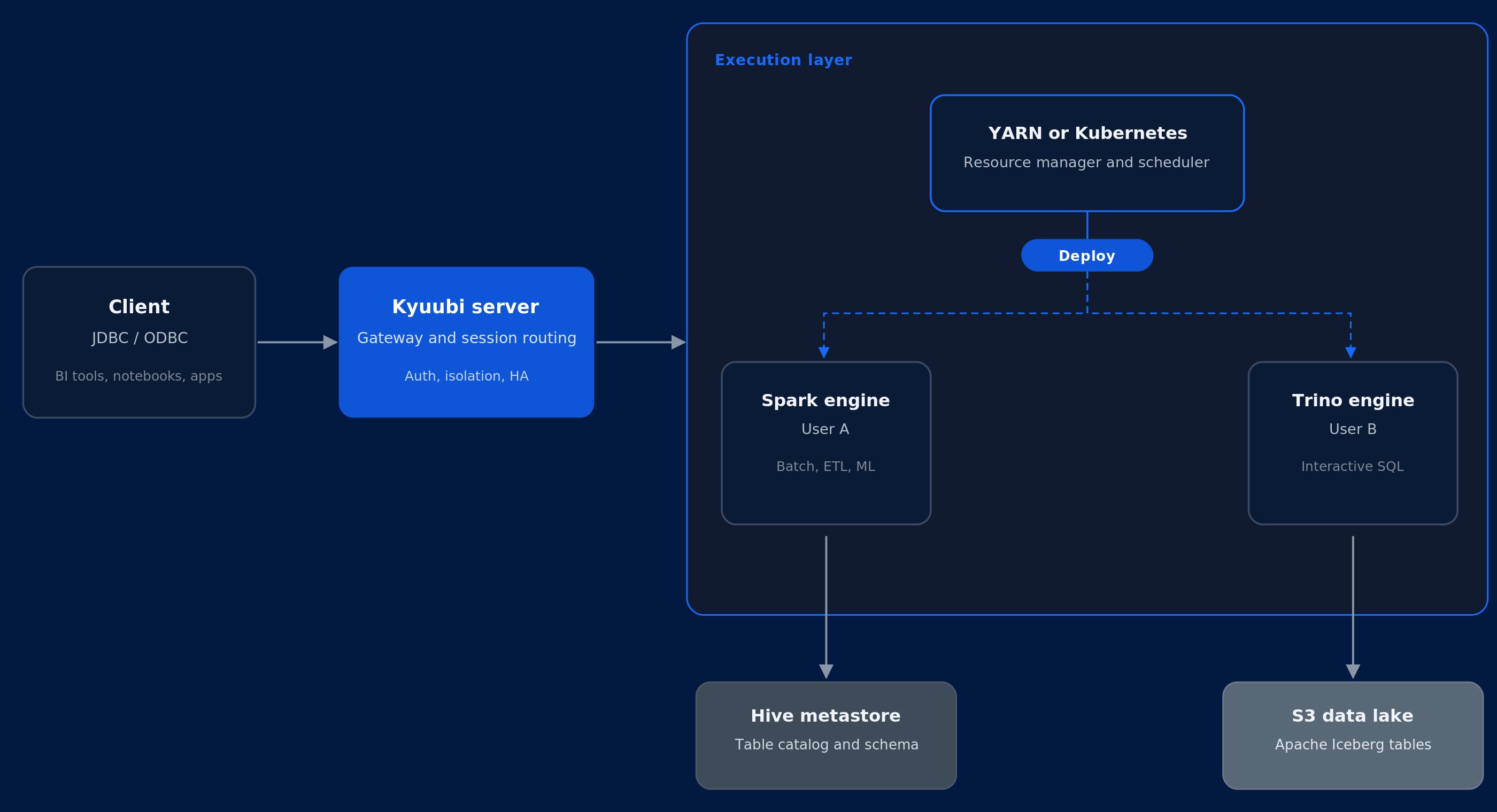 Kyuubi architecture
1. **Client**: The app or user submitting SQL queries via a JDBC or ODBC interface.
2. **Kyuubi server**: This is the central gateway node. It's a stateless service that
clients connect to. Its responsibilities include the following:
* Authenticating clients
* Managing JDBC/ODBC sessions
* Parsing and routing client requests
* Managing the lifecycle of backend engines
3. **Execution layer**: This comprises the orchestrator and the engine. When a client connects,
the Kyuubi server requests this layer to deploy an engine.
1. **YARN or Kubernetes**: The app orchestrator. It deploys a YARN container or Kubernetes
pod containing an engine.
2. **Engine**: A worker process that executes the SQL queries. A few examples include:
* **Spark engine**: A long-lived Spark driver process deployed for query execution.
Kyuubi can map client sessions one-to-one or allow multiple sessions to share the same engine.
* **Trino Engine**: A Trino coordinator node deployed for query execution. Same principles
as Spark; sessions can share or have isolated engines.
4. **Hive Metastore**: Kyuubi doesn't store table metadata on its own. The Hive Metastore (HMS)
serves as the catalog for tables, by providing metadata such as schema, partitions, and locations.
This setup provides features such as:
* Time travel
* Schema evolution
* Partition evolution
* Efficient inserts/updates/upserts
* Atomic commits
5. **S3 data lake**: The storage layer where data files reside. In NexusOne, Iceberg is the primary
table format. The engines read or write data here based on metadata from the Hive Metastore.
## Exploring the Kyuubi UI
The Kyuubi UI is a built-in web-based interface that provides real-time visibility into the
server's operations, active users, and running queries. It's an essential tool for both
administrators and developers for monitoring and debugging.
Kyuubi is available at the following designated URL:
```text theme={null}
https://kyuubi..nx1cloud.com/
```
When you purchase NexusOne, you receive a client name.
Replace `client` with your assigned client name.
The following sections describe several sidebars on the Kyuubi UI.
### Overview
This displays the main dashboard, which gives a high-level summary of the server uptime,
version, and aggregate metrics such as the total sessions and executed statements.
### Management
This management page displays information about sessions, operations, Kyuubi engines, and Kyuubi servers.
Management sidebar on the UI
* **Session:** The session page displays a table with the following details:
* `User`: Name of the user who created the JDBC or ODBC session
* `Engine ID`: ID of the engine used by the user
* `Client IP`: IP address of the client that made a request
* `Kyuubi Instance`: FQDN and port of the Kyuubi server, which registered the session
* `Session ID`: ID of the session created by the user
* `Create Time`: Session creation time
* `Operation`: Actions available for that session via web UI
* **Operations:** The operation page displays a table with the following details:
* `User`: Name of the user who started the operation
* `Operation ID`: ID of the operation requested by the user
* `Statement`: SQL of the statement
* `State`: Current state of the operation
* `State Time`: Amount of time the operation has spent in its current state
* `Completed Time`: End time of the operation
* `Duration`: The amount of time that the operation has been running
* `Operation`: Actions available for that operation via web UI.
* **Engines:** The engine page displays a table with the following details:
* `Engine Address`: IP address of the engine's server
* `Engine ID`: ID of the engine
* `Engine Type`: Type of engine. The current version of the web UI only shows `SPARK-SQL` engines
* `Share Level`: Shows who can use this engine
* `User`: Name of the user who created the engine
* `Version`: Version of the Kyuubi server associated with this engine
* `Operation`: Actions available for that engine via web UI
* **Server:** The Server page displays a table with the following details:
* `Server IP`: Kyuubi server's IP address
* `namespace`: Namespace to which the server belongs
* `Kyuubi Instance`: FQDN and port of the server
* `Version`: Version of the Kyuubi server
* `State`: Current state of the server
### Swagger
The Swagger page displays an interactive Kyuubi REST-API reference. It enables sending
requests to Kyuubi using a web interface.
To send a request, click the desired HTTP method, select **Try it out**, enter parameters
if necessary, and then click **Execute**.
Swagger sidebar on the UI
### SQL editor
This SQL editor page displays an interactive interface where you can directly write, format,
and execute SQL queries against the Kyuubi server. It's a quick way to run queries without an
external client and view logs.
This sidebar page comprises the following when you run a query:
* **Result**: A tabular format containing the result of a query.
* **Log**: Provides a history of executed SQL statements. You can see the query text,
execution time, and status. Then you can crucially access the detailed logs and error messages
for troubleshooting failed operations.
## Additional resources
* To learn practical ways to use Kyuubi in the NexusOne environment, refer to the
[Kyuubi hands-on examples](./kyuubi-hands-on-examples) page.
* For more details about Kyuubi, refer to the [Kyuubi](https://kyuubi.readthedocs.io/en/master/) official documentation.
Kyuubi architecture
1. **Client**: The app or user submitting SQL queries via a JDBC or ODBC interface.
2. **Kyuubi server**: This is the central gateway node. It's a stateless service that
clients connect to. Its responsibilities include the following:
* Authenticating clients
* Managing JDBC/ODBC sessions
* Parsing and routing client requests
* Managing the lifecycle of backend engines
3. **Execution layer**: This comprises the orchestrator and the engine. When a client connects,
the Kyuubi server requests this layer to deploy an engine.
1. **YARN or Kubernetes**: The app orchestrator. It deploys a YARN container or Kubernetes
pod containing an engine.
2. **Engine**: A worker process that executes the SQL queries. A few examples include:
* **Spark engine**: A long-lived Spark driver process deployed for query execution.
Kyuubi can map client sessions one-to-one or allow multiple sessions to share the same engine.
* **Trino Engine**: A Trino coordinator node deployed for query execution. Same principles
as Spark; sessions can share or have isolated engines.
4. **Hive Metastore**: Kyuubi doesn't store table metadata on its own. The Hive Metastore (HMS)
serves as the catalog for tables, by providing metadata such as schema, partitions, and locations.
This setup provides features such as:
* Time travel
* Schema evolution
* Partition evolution
* Efficient inserts/updates/upserts
* Atomic commits
5. **S3 data lake**: The storage layer where data files reside. In NexusOne, Iceberg is the primary
table format. The engines read or write data here based on metadata from the Hive Metastore.
## Exploring the Kyuubi UI
The Kyuubi UI is a built-in web-based interface that provides real-time visibility into the
server's operations, active users, and running queries. It's an essential tool for both
administrators and developers for monitoring and debugging.
Kyuubi is available at the following designated URL:
```text theme={null}
https://kyuubi..nx1cloud.com/
```
When you purchase NexusOne, you receive a client name.
Replace `client` with your assigned client name.
The following sections describe several sidebars on the Kyuubi UI.
### Overview
This displays the main dashboard, which gives a high-level summary of the server uptime,
version, and aggregate metrics such as the total sessions and executed statements.
### Management
This management page displays information about sessions, operations, Kyuubi engines, and Kyuubi servers.
Management sidebar on the UI
* **Session:** The session page displays a table with the following details:
* `User`: Name of the user who created the JDBC or ODBC session
* `Engine ID`: ID of the engine used by the user
* `Client IP`: IP address of the client that made a request
* `Kyuubi Instance`: FQDN and port of the Kyuubi server, which registered the session
* `Session ID`: ID of the session created by the user
* `Create Time`: Session creation time
* `Operation`: Actions available for that session via web UI
* **Operations:** The operation page displays a table with the following details:
* `User`: Name of the user who started the operation
* `Operation ID`: ID of the operation requested by the user
* `Statement`: SQL of the statement
* `State`: Current state of the operation
* `State Time`: Amount of time the operation has spent in its current state
* `Completed Time`: End time of the operation
* `Duration`: The amount of time that the operation has been running
* `Operation`: Actions available for that operation via web UI.
* **Engines:** The engine page displays a table with the following details:
* `Engine Address`: IP address of the engine's server
* `Engine ID`: ID of the engine
* `Engine Type`: Type of engine. The current version of the web UI only shows `SPARK-SQL` engines
* `Share Level`: Shows who can use this engine
* `User`: Name of the user who created the engine
* `Version`: Version of the Kyuubi server associated with this engine
* `Operation`: Actions available for that engine via web UI
* **Server:** The Server page displays a table with the following details:
* `Server IP`: Kyuubi server's IP address
* `namespace`: Namespace to which the server belongs
* `Kyuubi Instance`: FQDN and port of the server
* `Version`: Version of the Kyuubi server
* `State`: Current state of the server
### Swagger
The Swagger page displays an interactive Kyuubi REST-API reference. It enables sending
requests to Kyuubi using a web interface.
To send a request, click the desired HTTP method, select **Try it out**, enter parameters
if necessary, and then click **Execute**.
Swagger sidebar on the UI
### SQL editor
This SQL editor page displays an interactive interface where you can directly write, format,
and execute SQL queries against the Kyuubi server. It's a quick way to run queries without an
external client and view logs.
This sidebar page comprises the following when you run a query:
* **Result**: A tabular format containing the result of a query.
* **Log**: Provides a history of executed SQL statements. You can see the query text,
execution time, and status. Then you can crucially access the detailed logs and error messages
for troubleshooting failed operations.
## Additional resources
* To learn practical ways to use Kyuubi in the NexusOne environment, refer to the
[Kyuubi hands-on examples](./kyuubi-hands-on-examples) page.
* For more details about Kyuubi, refer to the [Kyuubi](https://kyuubi.readthedocs.io/en/master/) official documentation.